

After submitting your Belarus e-visa application on e-pasluga.by, you can track its processing status in real time by logging into your personal account on the official portal. The Belarus e-visa system displays four status stages – Submitted, Under Review, Approved, and Rejected – and sends email notifications when your status changes. This guide explains exactly how to check your e-visa status, what each status means, how long processing takes, and what to do if your application is delayed or rejected.
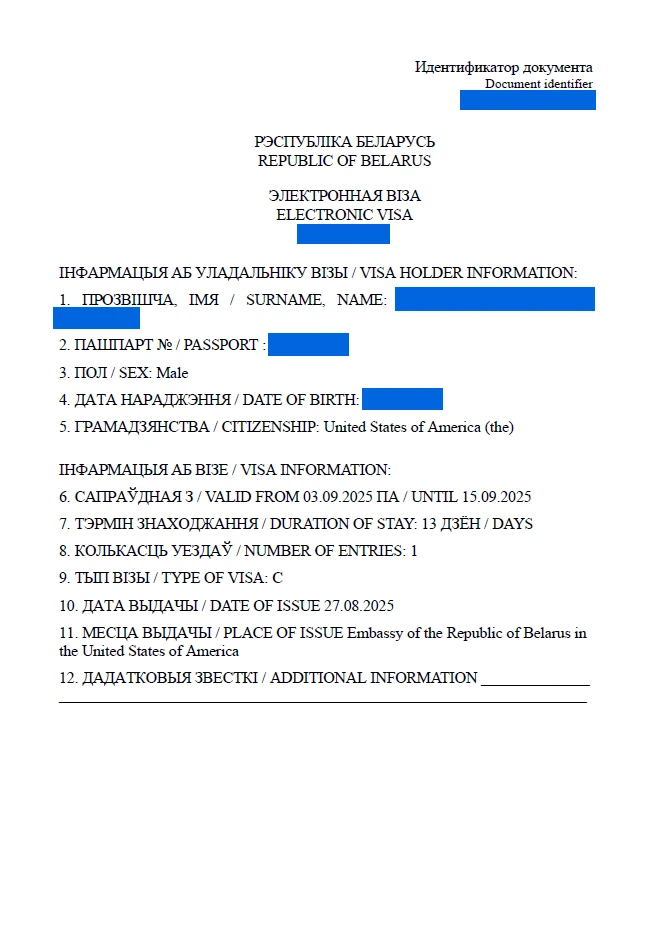
How to Check Your Belarus e-Visa Status on e-pasluga.by
To check your Belarus e-visa status, log in to your e-pasluga.by account using the email and password you registered with, then navigate to your submitted applications. The portal displays the current processing stage for each application in real time.
Step 1: Access the Official Portal
Open e-pasluga.by in your web browser. The portal is operated by the Consular Department of the Belarus Ministry of Foreign Affairs and supports three languages: English, Russian, and Belarusian. Select your preferred language from the top menu bar before logging in.
Step 2: Log In to Your Account
Click the login button and enter the email address and password you used when creating your e-pasluga.by account. This is the same account you used to submit your e-visa application – no separate registration is required to check status. If you forgot your password, use the password reset link on the login page. A reset email is sent to your registered address within minutes.
Step 3: Navigate to Your Applications
After logging in, locate the section displaying your submitted applications. On the e-pasluga.by portal, this appears under “My Services” or a similar label in the main dashboard. Your active and completed e-visa applications are listed here with their current status.
Step 4: View Current Status and Details
Each application entry shows the following information:
- Application number – assigned automatically at submission
- Visa type – e.g., single-entry e-visa for 30 days
- Current status – Submitted, Under Review, Approved, or Rejected
- Submission date – when you completed the online application
- Action required – any pending document requests from the consular section
Click on any application to view full details, including uploaded documents and any messages from the consular officer reviewing your file.
Understanding Belarus e-Visa Status Codes
The Belarus e-visa system uses four status codes to indicate where your application stands in the review process: Submitted, Under Review, Approved, and Rejected. Each status represents a distinct stage and determines what action – if any – you need to take.
| Status | Meaning | Action Required |
|---|---|---|
| **Submitted** | Application received, payment confirmed, queued for review | None – wait for processing |
| **Under Review** | Consular officer actively evaluating your documents | Monitor email for document requests |
| **Approved** | E-visa granted, PDF ready for download | Download, print, and verify details |
| **Rejected** | Application denied with reason provided | Review reason, correct issues, reapply |
Submitted
Your application has been successfully received and the visa fee payment has been confirmed. The application is now in the processing queue. The standard processing window is up to 7 calendar days from the submission date. No action is required from you at this stage, but check your email regularly in case the consular section requests additional documents.
Under Review
A consular officer has opened your file and is actively reviewing your uploaded documents, verifying your passport details, and evaluating your eligibility. If additional documentation is needed – such as a clearer passport scan or updated insurance – you will receive a notification by email and through the e-pasluga.by portal. Respond promptly to document requests, as delays in providing requested materials can restart the processing timeline.
Approved
Your Belarus e-visa has been granted. A PDF file of the e-visa becomes available for download within your e-pasluga.by account. Download the document immediately and verify that all details are correct: your full name, passport number, visa validity dates, and number of entries. Print at least two copies on A4 paper – one for presentation at the border and one as a backup. Digital copies on phones or tablets are not accepted at Belarus border checkpoints.
Rejected
Your application has been denied. The rejection notice includes the specific reason, which is displayed in your e-pasluga.by account and sent to your registered email. Common rejection reasons include incomplete documentation, passport validity issues, and discrepancies in application data. The e-visa application fee is non-refundable even if your application is rejected. You can submit a new application after addressing the stated rejection reason.
Belarus e-Visa Processing Time
The Belarus e-visa processes within 7 calendar days from the date of submission, with many applicants receiving a decision within 3 to 5 days. There is no expedited or rush processing option for e-visa applications – all submissions follow the same queue.
Processing times are measured in calendar days, not business days. This means weekends and public holidays count toward the 7-day window. However, the Consular Department typically does not process applications on weekends and Belarusian public holidays, so applications submitted just before a holiday weekend may take longer in practice.
Factors that affect processing speed:
- Completeness of documents – applications with all required documents uploaded correctly process fastest
- Travel season – processing may slow during peak travel months (May through September) due to higher application volumes
- Nationality – some nationalities require additional security screening, which extends processing time
- Document quality – blurry scans, expired insurance policies, or incorrect file formats trigger document requests that add days to the process
Important: The 7-day window begins when you complete payment, not when you start filling out the application. If you leave your application incomplete and return to finish it days later, the clock starts from the payment date.
What to Do If Your e-Visa Status Has Not Changed
If your Belarus e-visa status remains on “Submitted” or “Under Review” beyond the 7 calendar-day processing window, verify your application is complete and check your email for document requests before contacting support. Most delays result from incomplete documentation rather than system errors.
Step 1: Check Your Email
Review your inbox – including spam and junk folders – for any messages from the Belarus consular section. Document requests are sent to the email address registered on your e-pasluga.by account. Missing or ignoring these requests is the most common cause of extended processing times.
Step 2: Verify Application Completeness
Log in to e-pasluga.by and open your application. Confirm that all sections show as complete and all required documents are uploaded. Check that:
- Passport scan is clear and legible
- Passport photograph meets the 600×800 pixel minimum requirement
- Travel medical insurance covers the full duration of your stay and has a minimum coverage of EUR 10,000
- All personal details match your passport exactly
Step 3: Wait an Additional 3 to 5 Business Days
If your application appears complete and you have received no document requests, allow an additional 3 to 5 business days beyond the standard processing window. Seasonal surges and security reviews can extend processing beyond the typical 7-day timeframe.
Step 4: Contact Support
If processing exceeds 10 calendar days with no status update, use the contact or support option on the e-pasluga.by portal to inquire about your application. Provide your application number and passport number in your inquiry. You can also contact the Consular Department of the Ministry of Foreign Affairs directly by phone or email.
Do not submit a duplicate application while waiting for a response. Duplicate submissions create conflicts in the system and may result in both applications being rejected.
How to Download and Print Your Approved Belarus e-Visa
Once your Belarus e-visa status shows “Approved,” download the PDF document from your e-pasluga.by account, print at least two copies on A4 paper, and verify all details before your trip. The printed e-visa is mandatory for entry into Belarus.
Downloading the e-Visa PDF
- Log in to your e-pasluya.by account
- Navigate to your approved application
- Click the download button to save the e-visa PDF to your device
- Open the PDF and verify all information is correct
What to Verify on Your e-Visa
Check every field on the downloaded e-visa document:
- Full name – must match your passport exactly
- Passport number – must match your current passport
- Nationality – must be correct
- Visa validity period – the dates within which you must enter Belarus
- Number of entries – the e-visa is typically single-entry
- Maximum stay – usually 30 days from the date of entry
If any detail is incorrect, contact the Consular Department immediately through the e-pasluga.by portal before traveling. Errors on the e-visa document can result in denial of entry at the border.
Printing Requirements
- Print on regular A4 paper using a standard printer
- The document must be clearly legible – no smudges or faded text
- The QR code on the e-visa must be intact and scannable
- Print at least two copies – one for the border officer and one backup
- Digital copies displayed on phones, tablets, or laptops are not accepted at Belarus border crossings
Belarus e-Visa Status Check via Mobile App
Belarus offers the e-Pasluga mobile application, which allows travelers to verify their e-visa status and enables border officers to scan the QR code on the printed e-visa document. The app is available for both Android and iOS devices.
The e-Pasluga mobile app provides the following features:
- Status checking – view your e-visa application status without accessing the full web portal
- QR code verification – border officers scan the QR code on your printed e-visa using the official system to confirm its authenticity
- Push notifications – receive alerts when your application status changes
- Document storage – store a digital copy of your approved e-visa within the app for reference
While the mobile app is a convenient way to check status, it does not replace the requirement to carry a printed e-visa. The app supplements the printed document but is not accepted as a standalone travel document at Belarus border checkpoints.
Belarus e-Visa Rejection: Reasons and Reapplication
If your Belarus e-visa application is rejected, the specific reason is displayed in your e-pasluga.by account and sent to your registered email address. You can reapply after correcting the issue, but the application fee is non-refundable.
Common Rejection Reasons
- Incomplete documentation – missing passport scan, insurance policy, or accommodation proof
- Passport validity – passport expires within 90 days of your planned departure from Belarus
- Unclear documents – blurry passport scans, illegible insurance documents, or low-resolution photographs
- Application errors – mismatched passport numbers, incorrect dates of birth, or wrong nationality
- Insurance issues – policy does not cover Belarus, coverage below EUR 10,000, or policy does not cover the full stay duration
- Previous immigration violations – overstays, visa violations, or entry bans from previous Belarus visits
How to Reapply After Rejection
- Review the rejection reason carefully in your e-pasluga.by account
- Address the specific issue – gather corrected documents, renew your passport, or fix application errors
- Submit a new application through e-pasluga.by with the corrected or additional documentation
- Pay the application fee again – the fee is the same as your original application and is non-refundable
There is no formal appeal process for Belarus e-visa denials. The only option is to submit a new application. There is no waiting period between a rejection and a new application – you can reapply immediately after addressing the rejection reason.
Frequently Asked Questions
How do I check my Belarus e-visa status online?
Log in to your e-pasluga.by account using your registered email and password. Navigate to the “My Services” section to view the current status of your e-visa application. The portal displays real-time status updates showing whether your application is Submitted, Under Review, Approved, or Rejected.
How long does Belarus e-visa processing take?
The Belarus e-visa processes within 7 calendar days from the date of submission. Many applicants receive a decision within 3 to 5 days. There is no expedited processing option for e-visa applications. Processing times may extend during peak travel seasons (May through September).
What does “Under Review” mean for a Belarus e-visa?
“Under Review” means a consular officer has opened your file and is actively evaluating your documents and eligibility. This is a normal processing stage. If additional documents are needed, you will receive a notification by email and through the e-pasluga.by portal. Respond promptly to avoid further delays.
Can I check my Belarus e-visa status without logging in?
No. The e-pasluga.by portal requires you to log in with your registered credentials to view application status. There is no guest or reference-number-only lookup option. Keep your e-pasluga.by login credentials accessible throughout the processing period.
What should I do if my e-visa status has not changed after 7 days?
First, check your email (including spam folders) for any document requests from the consular section. Then log in to e-pasluga.by and verify your application is complete. If no issues are found, wait an additional 3 to 5 business days. If processing exceeds 10 calendar days, contact support through the e-pasluga.by portal.
Is the Belarus e-visa application fee refundable if rejected?
No. The e-visa application fee is non-refundable regardless of the application outcome. If your application is rejected, you must pay the full fee again when submitting a new application.
Can I track my Belarus e-visa using my passport number only?
No. You must log in to your e-pasluga.by account using your registered email and password to check status. The passport number alone is not sufficient for tracking. Your e-pasluga.by account is linked to all your e-visa applications.
Do I need to print my Belarus e-visa?
Yes. A printed e-visa is mandatory for entry into Belarus. Digital copies on phones or tablets are not accepted at border checkpoints. Print at least two copies of the e-visa PDF on A4 paper. The QR code on the printed document must be intact and scannable by border officers.
What happens if there is an error on my approved e-visa?
Contact the Consular Department immediately through the e-pasluga.by portal if any detail on your approved e-visa is incorrect. Errors in your name, passport number, or visa dates can result in denial of entry at the Belarus border. Do not travel with an e-visa that contains errors.
Can I submit multiple Belarus e-visa applications at the same time?
No. Do not submit duplicate or multiple applications for the same trip. Duplicate submissions create conflicts in the system and may result in both applications being rejected. Submit one application and wait for the processing outcome before taking any further action.