

After submitting a Belarus visa application, you can check its status online through the official e-pasluga.by portal for e-visas, or by contacting the relevant embassy, consulate, or visa application center for consular visas. Knowing how to track your application removes uncertainty and helps you plan your trip with confidence. This guide covers every method for checking your Belarus visa status, what each status code means, and what to do next.
What You Need Before Checking Your Status
To check your Belarus visa application status, gather your application reference number, passport details, and the email address used during submission. The exact documents depend on whether you applied for an e-visa online or submitted a consular application at an embassy.
For e-Visa Applications (e-pasluga.by)
If you applied for a Belarus e-visa through the official online portal, you need:
- Account credentials – the email and password you used to register on e-pasluga.by
- Application number – assigned automatically when you submitted the e-visa application
- Access to your registered email – for any notifications or confirmation messages
For Consular (Embassy) Applications
If you applied through a Belarusian embassy, consulate, or visa application center, keep the following on hand:
- Receipt or invoice number – issued when you submitted your documents
- Passport number – used to identify your application in the tracking system
- Embassy or consulate contact details – phone number and email of the mission where you applied
- Submission date – to calculate expected processing time (typically 5 business days for standard processing)
How to Check Your Belarus e-Visa Status on e-pasluga.by
The primary method for tracking a Belarus e-visa is logging into your personal account on e-pasluga.by, the official government portal operated by the Consular Department of the Ministry of Foreign Affairs. The portal displays real-time status updates for all e-visa applications.
Step-by-Step: Checking e-Visa Status Online
Step 1: Visit the official portal.
Navigate to e-pasluga.by in your web browser. The portal supports English, Russian, and Belarusian language options. Select your preferred language from the menu at the top of the page.
Step 2: Log in to your account.
Click the login button and enter the email address and password you used when creating your account. If you applied through the portal, you already have an account – no separate registration is needed to check status.
Step 3: Navigate to your applications.
After logging in, locate the section showing your submitted applications. On the e-pasluga.by portal, this is typically found under “My Services” or a similar label. Your active and completed applications are listed here.
Step 4: View the current status.
Each application displays its current processing stage. The e-visa system uses four main status levels: Submitted, Under Review, Approved, and Rejected. The status updates in real time as your application moves through processing.
Step 5: Download your approved e-visa.
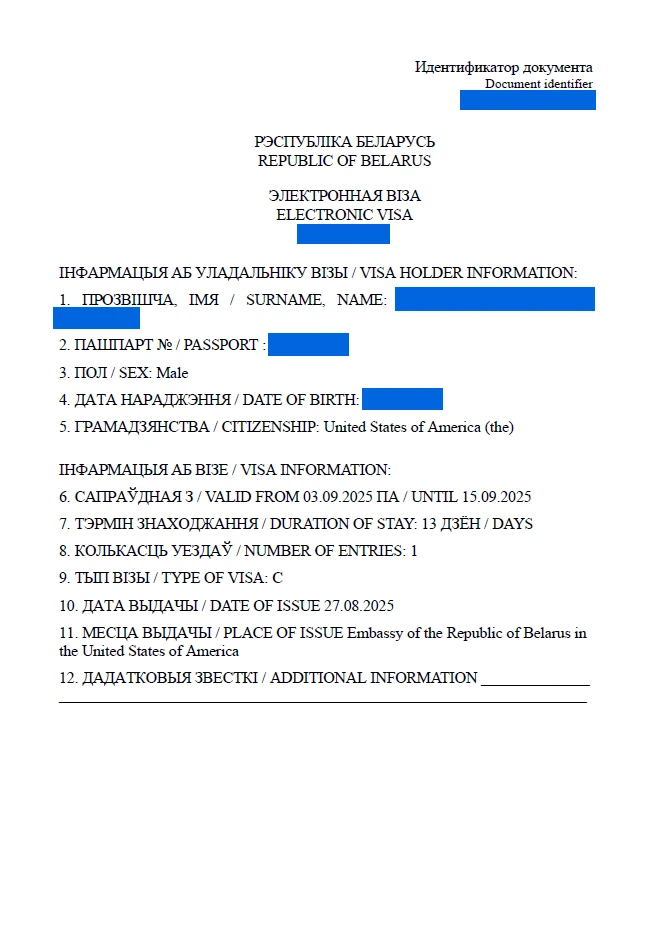
Once your application status shows Approved, a PDF file of your e-visa becomes available for download within your account. Download and print at least two copies – one for your records and one to present at the Belarus border crossing.
Important: The Belarus e-visa must be printed on paper. Digital copies displayed on a phone or tablet are not accepted at border checkpoints. Always carry a printed copy along with your valid passport.
Understanding Belarus Visa Status Codes
Your Belarus e-visa application moves through four distinct status stages, each indicating a specific point in the review process. Understanding what each status means helps you know whether action is needed.
| Status Code | Meaning | What Happens Next |
|---|---|---|
| **Submitted** | Your application has been received and payment confirmed. It is queued for review. | Wait for processing. No action needed. |
| **Under Review** | A consular officer is evaluating your documents and eligibility. Additional documents may be requested. | Monitor your email for any document requests. |
| **Approved** | Your e-visa has been granted. The PDF is ready for download. | Download, print, and carry the e-visa when traveling. |
| **Rejected** | Your application has been denied. The reason is provided in your account or via email. | Review the rejection reason, address the issue, and reapply if eligible. |
What to Do at Each Stage
Submitted: The standard processing window is up to 7 calendar days from the date of submission. During this period, your application is in the queue. No action is required from you, but check your email regularly in case the consular section requests additional documents.
Under Review: This status means a consular officer has opened your file. If additional documentation is needed, you will receive a notification. Respond promptly – delays in providing requested documents restart the processing timeline.
Approved: Download the e-visa PDF from your e-pasluga.by account immediately. Verify that all details (name, passport number, dates) are correct. Print the document and keep it with your passport for the duration of your trip.
Rejected: The rejection notice includes the reason, which may involve incomplete documentation, passport validity issues, or discrepancies in the application. You can reapply after correcting the problem, but the application fee is non-refundable (typically EUR 66 for the e-visa).
How to Track a Consular (Embassy) Visa Application
For visa applications submitted at a Belarusian embassy or consulate, tracking options are more limited than for e-visas, since there is no unified online tracking portal for consular applications. Each diplomatic mission handles status inquiries independently.
Contacting the Embassy Directly
The most reliable way to check a consular visa application is to contact the embassy or consulate where you submitted your documents:
- By phone: Call the consular section during posted business hours. Have your passport number and receipt number ready. Many Belarusian embassies have limited phone hours, typically 11:00-13:00 and 15:30-17:30 on weekdays.
- By email: Send a brief inquiry to the consular section’s email address with your full name, passport number, and submission date. Allow 1-2 business days for a response.
- In person: Visit the embassy during consular hours. Bring your receipt and passport. In-person inquiries may receive faster responses than phone or email.
Standard Processing Timeline
Consular visa applications follow a predictable timeline:
- Standard processing: 5 business days from the date of acceptance
- Expedited processing: 1-2 business days for an additional fee (typically double the standard visa fee of EUR 60)
- Business days exclude weekends and public holidays of both the host country and Belarus
If your application exceeds the standard processing window without a response, contact the embassy. Delays most commonly result from incomplete documentation or additional security checks.
Tracking Through VFS Global or BLS International
In countries where Belarus has outsourced visa application processing, third-party services like VFS Global and BLS International provide their own online tracking systems for submitted applications. These platforms offer real-time status updates using your reference number and passport details.
VFS Global Tracking
If you submitted your Belarus visa application through VFS Global:
- Visit visa.vfsglobal.com and select Belarus and your country of residence
- Navigate to the “Track Application” section
- Enter the reference number from your VFS receipt
- Enter your date of birth in the required format (typically DD/MM/YYYY)
- Submit to view your current application status
VFS Global also offers SMS and email notification services for status updates, which may require an additional fee at the time of submission.
BLS International Tracking
For applications processed through BLS International:
- Visit blsinternational.com and locate the Belarus section for your region
- Click “Track Application”
- Enter your reference number and date of birth
- View the current processing stage
VFS vs. BLS vs. Embassy: Which Method Do You Have?
| Tracking Method | Where You Applied | What You Need |
|---|---|---|
| **e-pasluga.by** | Online portal (e-visa) | Email + password |
| **VFS Global** | VFS Visa Application Centre | Reference number + DOB |
| **BLS International** | BLS Visa Application Centre | Reference number + DOB |
| **Embassy direct** | Belarusian embassy/consulate | Passport number + receipt |
If you are unsure which method applies to your application, check your receipt or confirmation email. It will indicate whether the application was processed through the online portal, VFS, BLS, or directly at the embassy.
What to Do If Your Belarus Visa Status Has Not Changed
If your Belarus e-visa status has remained on “Submitted” or “Under Review” beyond the standard 7 calendar-day processing window, the first step is to verify that you submitted all required documents correctly. Most processing delays result from incomplete documentation rather than system errors.
Common Causes of Delayed Processing
- Incomplete documents – missing scans, expired insurance, or unclear passport photos
- Peak travel season – applications surge during summer months (June-August) and around Belarusian national holidays
- Additional security review – some nationalities or individual applications require extended background checks
- Technical issues – occasional outages on e-pasluga.by may temporarily slow processing
Steps to Take
- Check your email – including spam and junk folders – for any document requests from the consular section
- Log in to e-pasluga.by and verify that all sections of your application show as complete
- Wait an additional 3-5 business days beyond the standard window before escalating
- Contact the consular section via the support or contact option on the e-pasluga.by portal if processing exceeds 10 calendar days
- Call or email the relevant embassy if your application was submitted through a consular channel
Important: Do not submit a duplicate application while waiting for a response. Duplicate submissions create conflicts in the system and may result in both applications being rejected.
What Happens After Your Belarus Visa Is Approved
Once your Belarus e-visa is approved, you must download the PDF from your e-pasluga.by account, print it, and carry it with your passport when traveling to Belarus. The e-visa is valid for a single entry with a maximum stay of 30 days.
Downloading and Printing Your e-Visa
- Log in to e-pasluga.by
- Navigate to your approved application
- Download the e-visa PDF document
- Print at least 2 copies on regular A4 paper
- Verify all details: full name, passport number, visa validity dates, and number of entries
Verifying Your e-Visa with the Mobile App
Belarus has introduced verification of e-visas through the e-Pasluga mobile application. Border officers may scan the QR code on your printed e-visa using this app. Having a properly printed e-visa ensures a smooth verification process at the border.
At the Border Checkpoint
When arriving in Belarus, present the following documents to the border officer:
- Your valid passport (with at least 90 days validity remaining beyond your planned departure)
- Printed e-visa document
- Proof of accommodation (hotel booking or invitation letter)
- Return or onward travel ticket
- Travel medical insurance with coverage of at least EUR 10,000 valid in Belarus
The border officer will stamp your passport with the entry date. Keep this stamp – you need it when leaving Belarus.
Frequently Asked Questions
Can I check my Belarus visa status online?
Yes. If you applied for an e-visa through e-pasluga.by, log in to your account to view the current status of your application. The portal displays real-time updates. For consular applications, contact the embassy or use VFS Global or BLS International tracking if your application was processed through those services.
How long does it take to get a Belarus visa status update?
The Belarus e-visa processes within **7 calendar days** from submission. Many applicants see status changes within **3-5 days**. Consular applications at embassies typically process in **5 business days** for standard service and **1-2 business days** for expedited processing.
What does “Under Review” mean for a Belarus visa application?
“Under Review” means a consular officer is actively examining your application and supporting documents. This is a normal stage in the processing workflow. If additional documents are needed, you will receive a notification by email or through the e-pasluga.by portal.
Can I check my Belarus visa status using my passport number?
For e-visa applications, you track status through your e-pasluga.by account using your login credentials, not just the passport number. For VFS or BLS applications, you need both the reference number from your receipt and your date of birth. Passport number alone is not sufficient for online tracking.
What happens if my Belarus visa application is rejected?
If your e-visa application is rejected, the rejection reason is displayed in your e-pasluga.by account. Common reasons include incomplete documentation, passport validity issues, or application errors. You can reapply after correcting the issue, but the application fee (**EUR 66** for the e-visa) is non-refundable.
Is there a way to expedite Belarus e-visa processing?
No. The e-visa system on e-pasluga.by does not offer an expedited or rush processing option. All applications follow the same queue with a maximum processing time of **7 calendar days**. If you need a visa faster, apply through a Belarusian embassy or consulate, where expedited processing of **1-2 business days** is available for an additional fee.
Do I need to print my Belarus e-visa?
Yes. A printed e-visa is mandatory for entry into Belarus. Digital copies on phones or tablets are not accepted at border checkpoints. Print at least **two copies** of the e-visa PDF – one for presentation at the border and one as a backup. The e-visa includes a QR code that border officers may scan using the e-Pasluga mobile application.
How do I track a Belarus visa application submitted at an embassy?
Contact the Belarusian embassy or consulate where you submitted your application directly by phone or email during consular business hours. Have your passport number and receipt number ready. If your application was processed through VFS Global or BLS International, use their respective online tracking portals with your reference number and date of birth.
Related Guides
- Belarus eVisa: Complete Guide – Full overview of the electronic visa system
- Belarus Visa Processing Time – Detailed timelines for every application channel
- Belarus Visa Requirements – Documents, eligibility, and checklist
- How to Apply for a Belarus Visa Online – Step-by-step online application guide
Disclaimer
Visa policies and processing procedures can change without notice. The information in this guide is current as of 2026 and should be verified against the official Belarus Ministry of Foreign Affairs website and the e-pasluga.by portal before traveling. Always consult official sources for the most up-to-date information on visa status tracking.